

A WhatsApp channel for business and personal branding can quietly boost your reach, trust, and authority.
I learned this firsthand after a simple morning chat with my wife.
I had always thought that the WhatsApp Business app didn’t support creating new channels. During our conversation, she casually mentioned that she had created a WhatsApp channel for her counseling practice right inside the app.
She is a marriage and family life counsellor, so a dedicated WhatsApp channel fits her work perfectly.
It gives her a clean space to share insights, training dates, and helpful resources with her audience. No clutter, no group noise, just straight value.
She showed me where the feature was hiding inside WhatsApp Business.
In a few seconds, I launched mine and named it The Digital Strategy by Adeyemi Adetilewa.
That simple moment turned into this guide. In this article, you’ll learn how to create a WhatsApp channel for business and personal branding and how to use it to grow your influence.
What Is a WhatsApp Channel?
A WhatsApp Channel is a one-to-many broadcast feature inside WhatsApp. You publish content, your followers receive it, and there is no group chatter to distract them.
Only the channel owner can post. Your audience gets your updates privately and silently, which makes it perfect for:
- Business announcements
- Marketing campaigns
- Brand storytelling
- Content distribution
- Event updates or launches
For entrepreneurs, coaches, consultants, and content creators, a WhatsApp channel offers:
- Direct communication without paid ads
- High message delivery rates
- Simple audience building
- A focused content distribution system
- Stronger visibility for your personal brand
When you think of a WhatsApp channel for business and personal branding, think of it as your own broadcast hub sitting right inside your audience’s phones.
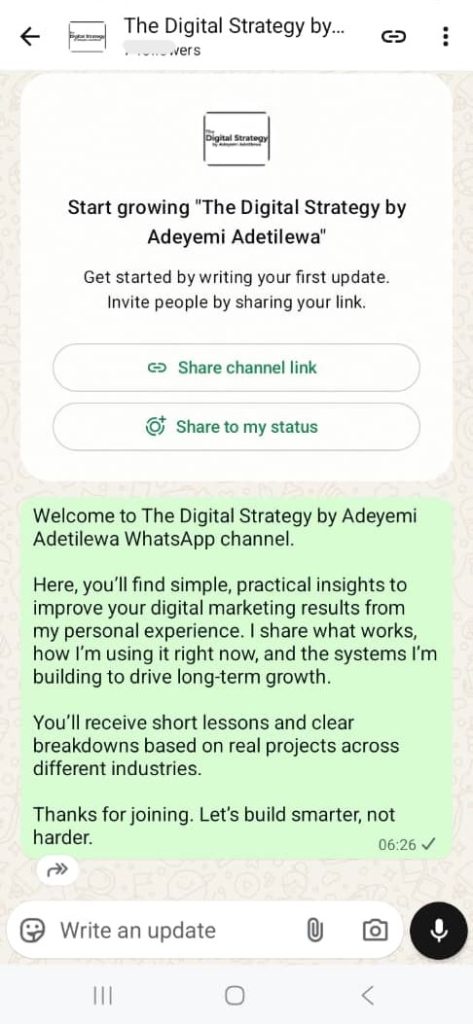
Inside The Digital Strategy by Adeyemi Adetilewa WhatsApp Channel
The Digital Strategy by Adeyemi Adetilewa channel is my focused space for sharing practical online growth strategies.
I created it to help business owners, creators, and marketers improve visibility, attract better clients, and build strong brands. I share short, actionable updates that you can apply quickly, even with a full schedule.
Some of the topics I cover include:
- Content growth frameworks
- Organic traffic tips
- Social media strategy
- Lessons from real client work in digital marketing
If you prefer direct updates without algorithms, distractions, or social feeds, this WhatsApp channel is perfect for you. By joining, you stay close to my latest ideas, templates, and strategies in one simple stream.
How to Create a WhatsApp Channel on the WhatsApp Business App
Creating a WhatsApp channel for business and personal branding inside the WhatsApp Business app is simple.
The feature is now live in most regions, and the setup takes only a few minutes. Follow this step-by-step guide:
1. Open the WhatsApp Business app
Make sure you are using the latest version from your app store.
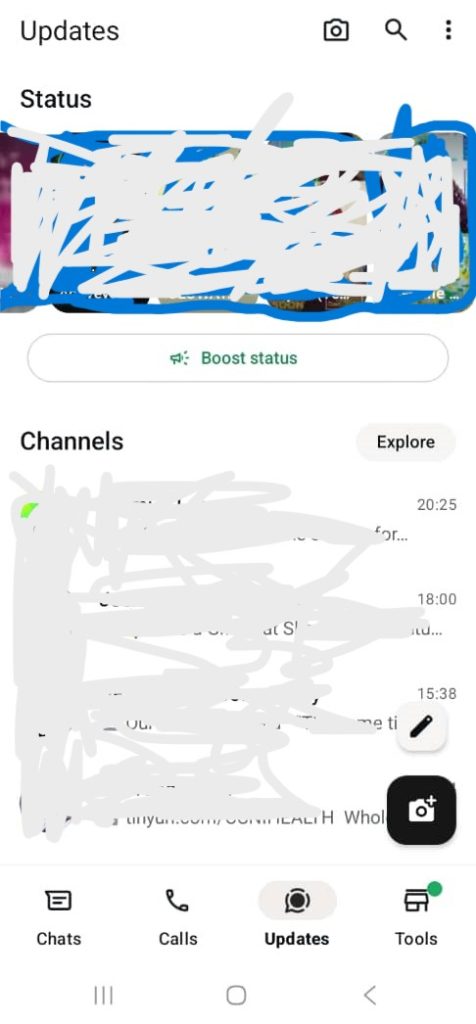
2. Go to the “Updates” tab
This is the section that shows WhatsApp status updates and existing channels.
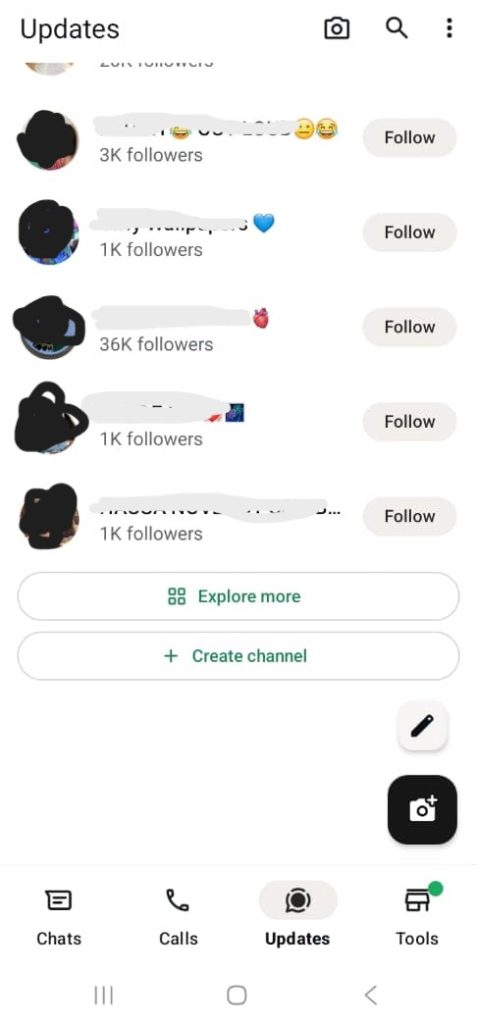
3. Tap the “+” icon in the bottom right corner
Scroll to the bottom of the page until you see the option to create a new channel.
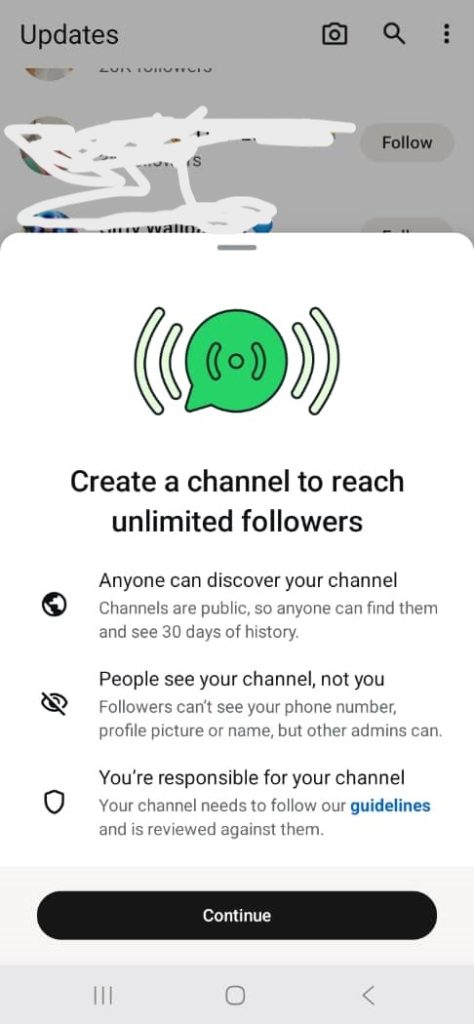
4. Select “Create Channel.”
WhatsApp will guide you through a quick setup screen.
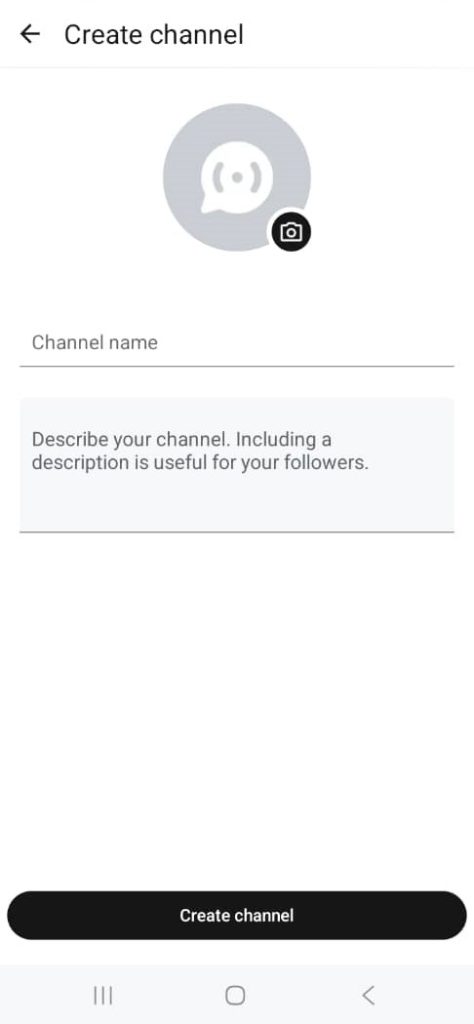
5. Add your channel name
Use something clear and recognizable, such as
- Your business name
- Your personal brand name
- A mix of both
For example, The Digital Strategy by Adeyemi Adetilewa.
6. Write a channel description
Keep it simple and direct. Explain:
- Who the channel is for
- What type of content will you share?
- How often can people expect updates
7. Upload a channel profile photo or logo
Use a clean brand logo or a professional headshot. Consistent visuals help people remember you.
8. Tap “Create channel” to publish your channel
Once it is live, you can start posting right away.
That’s all it takes to launch a WhatsApp channel for business and personal branding using the WhatsApp Business app.
How to Optimize Your WhatsApp Channel for Business Growth
A WhatsApp channel works best when you treat it like a focused content platform.
If you just post at random, people will ignore it or mute it. If you want to grow a WhatsApp channel for business and personal branding, follow these practical tips.
1. Define Your Content Focus
Decide what your channel will be known for. A clear focus helps people know why they should stay subscribed.
You could focus on:
- Digital marketing insights
- Business and product updates
- Service or product announcements
- Behind-the-scenes content
- Personal branding stories
- Industry tips or trends
If someone joins your channel, they should instantly understand what they will gain and why they should keep paying attention.
2. Keep Your Posts Short and Clear
WhatsApp is a fast platform. People open messages, scan, and move on.
Long blocks of text turn people off. Use:
- Short paragraphs
- Clear instructions
- Bullet points for complex ideas
- Simple, direct language
For example, instead of a long essay about a new service, share what it is, who it helps, and one clear action step.
3. Post Consistently, Not Randomly
Consistency builds trust. You do not need to post every day, but you should post on a predictable schedule.
You might choose:
- 3 updates per week
- A short weekly summary
- A themed day, like “Monday Strategy Tip.”
When your audience knows what to expect, they are less likely to mute the channel and more likely to engage.
4. Use Mixed Content Formats
WhatsApp Channels allow more than just text. Mixing formats keeps your content fresh and more engaging.
Use:
- Text posts with key insights
- Links to blog posts or videos
- Images or simple graphics
- Short videos or screen recordings
- Documents or PDFs with checklists or templates
For example, you can share a short tip as text, then attach a PDF cheat sheet that people can save and refer back to later.
5. Promote Your WhatsApp Channel
People will not magically find your channel. You have to share it. Make it part of your overall marketing system.
Add your WhatsApp channel link to:
- Your website or landing pages
- Social media bios and posts
- Email newsletters and signatures
- Blog posts and content pieces
- WhatsApp Status updates
- Client and community groups (where relevant and welcome)
The easier you make it to join, the faster your channel will grow.
6. Add Clear Calls to Action
A WhatsApp channel is not only for broadcasting information. It can drive action.
Include simple calls to action in your posts. For example:
- “Reply to this message if you want more details about the offer.”
- “Save this post for later and share it with a friend who needs it.”
- “Click the link to book a discovery call.”
Small prompts help your channel grow and turn passive followers into active fans or clients.
Why WhatsApp Channels Work for Personal Branding
A WhatsApp channel for business and personal branding gives you a direct line to your strongest audience. No algorithm sits between you and the people who want to hear from you.
Here is why WhatsApp channels are so effective for personal brands:
- High trust: People already use WhatsApp for close contacts, so your updates feel more personal.
- Instant delivery: Your content reaches people quickly, often with push notifications.
- Privacy for followers: Subscribers stay anonymous to others, which many people prefer.
- Low friction: It is easy to join, mute, or leave, so people feel in control.
- Simple to maintain: You do not need fancy tools or complex setups.
If you are a coach, consultant, service provider, educator, or creator, a WhatsApp channel becomes a strong extension of your brand.
You can share:
- Daily or weekly tips
- Client success stories
- Behind-the-scenes decisions
- Early access offers or discounts
- Links to new content before you post them elsewhere
Over time, your channel becomes a place where followers feel closer to you and more ready to work with you.
Conclusion
Creating a WhatsApp channel for business and personal branding is one of the simplest steps you can take to grow your influence.
It brings you closer to your audience, gives you a direct way to share your ideas, and strengthens how people see your brand.
My own channel started from a short conversation with my wife. The setup took a few moments, and the benefits became clear almost immediately.
If you have been thinking about starting a WhatsApp channel, treat this as your sign to do it today. Set up your channel, define your focus, share consistent value, and use it as a powerful tool to grow both your business and your personal brand.

Adeyemi Adetilewa is a senior digital marketing specialist and founder of IPB Digital Network, a company powering his digital publishing and marketing projects. He also runs his personal website, AdeyemiAdetilewa.com, where he shares insights on SEO, content marketing, and business growth. With over 10 years of experience, Adeyemi has built niche platforms such as IdeasPlusBusiness.com, SaaSXtra.com, CoinBuns.com, and PayAPeer.com, and contributed to publications including The Huffington Post, The Good Men Project, Addicted2Success, and Hackernoon.