Hashnode’s Free GraphQL API Is Gone: What Happened and What To Do Next

Written by
Adeyemi Adetilewa

If your headless blog stopped showing posts and you cannot figure out why, the answer is not in your code.
Hashnode shut down free GraphQL API access in June 2026, and every headless site that depended on it is now returning an HTML page instead of post data.
This article explains exactly what changed, who is affected, and what your real options are, including the path I took to migrate my own site in under a week without losing a single URL or ranking. You can read more about why I moved my WordPress website to Next.js and Hashnode earlier this year when the Hashnode API was still free.
What Hashnode Actually Changed
Hashnode’s public GraphQL endpoint at gql.hashnode.com was the backbone of every headless blog built on their platform. Developers used it to fetch posts, slugs, tags, cover images, and reading time. All the data a Next.js or Gatsby frontend needs to render a blog.
On June 11, 2026, Hashnode published a changelog entry titled “GraphQL API is moving to a paid offering.” The core change: every API request now requires an active Pro plan on your publication. Read queries, write queries, all of them. The free tier no longer includes any API access at all.
Their stated reason was scale abuse. Scrapers and automated bots were hammering the free endpoint and degrading performance for paying users. That is a legitimate infrastructure problem. The execution, however, left developers with no migration window or grace period. Sites went dark the same day the change went live.
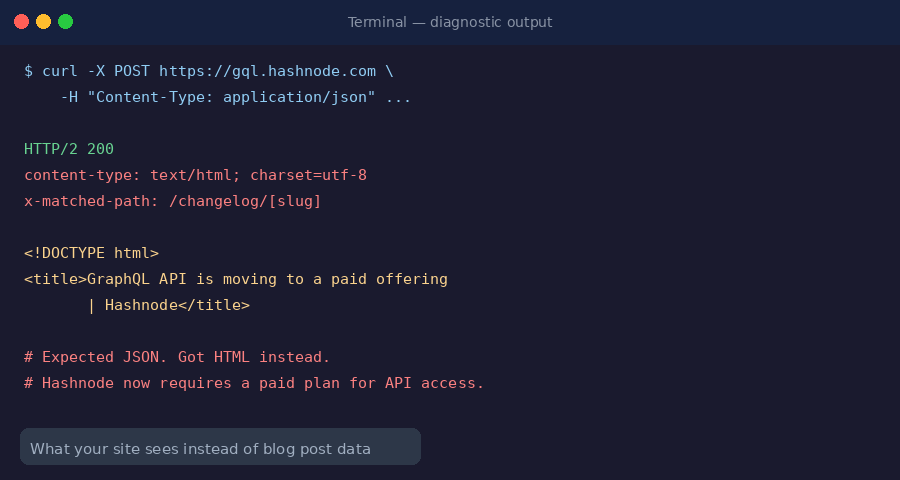
The failure mode is particularly confusing because the API still returns HTTP 200. It does not return a 401 or 403. It returns a full HTML page, Hashnode’s own site, with the title “GraphQL API is moving to a paid offering.”
Most error handlers never anticipate a 200 response containing HTML instead of JSON, so most affected sites showed an empty blog with no visible error message rather than a meaningful failure.
Who This Affects
Any developer who built a headless blog using Hashnode as the CMS backend is affected.
The typical setup: Hashnode hosts your content, your Next.js or Gatsby site fetches posts via the GraphQL API on each request or at build time, and your custom domain displays the rendered result.
1. Sites using force-dynamic with cache: 'no-store': Breakage was immediate and total. Every visitor triggered a fresh API call that returned HTML instead of JSON, and every visitor saw an empty blog.
2. Sites using ISR (Incremental Static Regeneration): You had a window of working pages from the last successful cache before revalidation started failing silently.
3. Sites using Hashnode’s native subdomain (yourname.hashnode.dev) without a custom domain or API integration, completely unaffected. This change only hits developers who built custom frontends on top of the API.
The Next.js documentation on data fetching is worth revisiting if you are unsure which caching strategy your current setup uses. Understanding whether your app re-fetches at runtime or serves cached content is the first step to knowing how exposed you were.
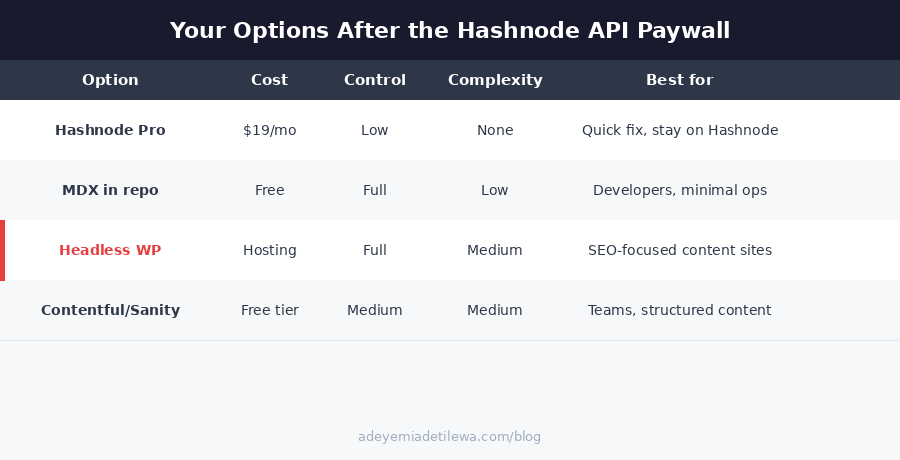
The Four Options You Have Right Now
Option 1: Upgrade to Hashnode Pro
The fastest path back to a working blog. Log in to your Hashnode dashboard, upgrade to Pro, and the API resumes working immediately. No code changes required.
The case for it: If you are happy with Hashnode as a writing environment and the monthly cost fits your budget, this is 20 minutes of work.
The case against it: You are now paying for access to your own content. More importantly, you have seen what Hashnode does when it decides to change its business model. The free tier disappeared without a migration window. Nothing prevents the same thing from happening to the Pro tier’s API access, its pricing, or its terms of service.
Option 2: MDX Files in Your Repo
Move your content into .mdx files stored directly in your GitHub repository. No CMS, no API, no third-party dependency. Posts are markdown files that live alongside your code, version-controlled the same way your application code is.
The trade-off is real: you lose a visual editor, mobile writing apps, and any collaboration features. For a solo technical writer, those losses are manageable. For a content team, they are not. Build time is instant because there is no API to call, and nothing can be paywalled because the content is yours entirely.
Option 3: Self-Hosted Headless WordPress
This is the option with the best long-term SEO ceiling and the most complete content operations tooling. WordPress gives you Yoast or RankMath SEO, redirect management, internal link suggestions, content audits, and a writing interface that any non-technical collaborator can use without training.
The WPGraphQL plugin exposes your WordPress content through a GraphQL endpoint you control entirely. Your Next.js frontend queries it the same way it queried Hashnode’s API.
The critical difference: you own the server, the database, and the API. No pricing change at a company you do not control can take it down. I cover the full setup, DNS configuration, and migration process in the detailed guide on how I moved from Hashnode to headless WordPress.
Option 4: Third-Party Headless CMS
Contentful, Sanity, Hygraph, and Payload all offer headless CMS capabilities with free tiers. They are genuine alternatives with strong developer ecosystems and well-documented APIs.
The honest caveat: a free tier at any venture-funded SaaS company carries the same underlying risk as Hashnode’s free API did. Contentful’s pricing history shows how these models evolve as companies mature and growth targets change. Switching to a different free tier resets the clock. It does not eliminate platform risk.
What I Did and Why
My site, adeyemiadetilewa.com, runs on Next.js deployed on Vercel. I noticed the blog was empty on June 20, 2026, and spent an hour building a diagnostic API route before the HTML response from Hashnode made the cause obvious. The response body contained Hashnode’s own website, not my post data.
I chose self-hosted headless WordPress for three specific reasons. First, I already had WordPress hosting from another project, making the infrastructure cost zero. Second, I care about SEO tooling (plugins, redirect management, content audits) in a way that makes a flat-file MDX setup genuinely limiting for how I work.
Third, I write about building content systems and digital products, so running my personal site on a well-architected headless stack is itself a demonstration of the work.
The migration took less than a week from diagnosis to a fully working blog. All posts are live at their original URLs, featured images are intact, and internal links are corrected.
I built a browser-based migration tool to move posts from Hashnode to WordPress without needing Node.js installed locally, which made the content transfer accessible regardless of technical setup. The complete step-by-step guide is at adeyemiadetilewa.com/blog.
The Architecture That Prevents This From Happening Again
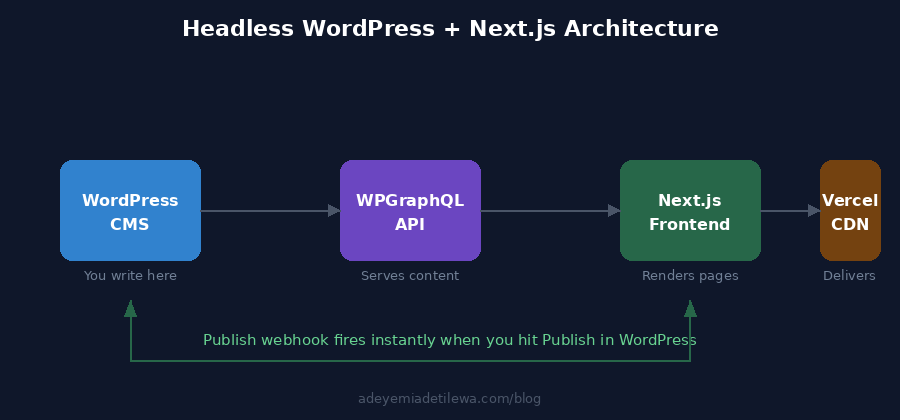
The setup I landed on has three properties that make it resilient to the kind of failure Hashnode caused.
1. ISR with a 24-hour fallback window.
Each page is cached and revalidated in the background every day. If the WordPress API is temporarily unreachable during a revalidation cycle, visitors keep seeing the last successful cached version rather than an empty page.
This is a fundamental architectural improvement overforce-dynamic, where a single API failure means every visitor hits a broken page.
2. An instant-update publish webhook.
When I hit Publish in WordPress, a webhook fires immediately and tells the Next.js site to refresh that post’s page, the blog index, and the sitemap.
I get the freshness of real-time updates without the fragility of fetching live on every request. The Next.js ISR documentation covers the technical implementation in detail.
3. Full ownership of the API layer.
My WordPress install is on a subdomain I control. The WPGraphQL endpoint it exposes will remain accessible for as long as I keep that hosting active. No company’s pricing decision can change that.
The Broader Lesson
Hashnode did not do anything unusual. Platforms offer free API access to drive adoption, then they find a business model that requires monetising that access. It happened with Twitter’s API in 2023. It happened with Reddit’s API in 2023. It happened with Hashnode in 2026.
The pattern is consistent enough that treating any free third-party API as a permanent dependency for critical site infrastructure is a risk worth taking seriously.
That does not mean you should never use third-party platforms. It means you should build your system so that swapping out the content layer is a week’s work rather than a month’s emergency. The test is simple: if the company behind your CMS, your API, or your free tier changed its pricing tomorrow, how long would your site be broken?
If you are still on Hashnode and deciding what to do, the choice is genuinely yours. Paying for Pro is not irrational if the cost works and the writing environment suits you. But if you have been considering owning more of your stack, this is the moment that makes the case for you without needing any further argument.
I have documented my full migration process, including every mistake, every bug, and every fix, for exactly this reason. You can read the full guide at adeyemiadetilewa.com/blog, or explore more of my work building content systems and digital products at adeyemiadetilewa.com/portfolio.
Adeyemi Adetilewa is a technical SEO specialist and product marketing specialist. He has been building digital products since 2013. Read more at adeyemiadetilewa.com/about.
Tags
Share
About the author
Adeyemi Adetilewa
Content Strategy, Product Marketing, and SEO for B2B SaaS
Adeyemi Adetilewa combines expertise in content strategy, product marketing, technical SEO, and AI to help B2B SaaS companies drive product adoption, customer engagement, and sustainable organic growth. Open to remote Product Marketing roles.
Work With Me
Hiring for product marketing, or scaling a B2B SaaS?
I help B2B SaaS companies turn product marketing, content strategy, and technical SEO into systems that drive adoption and organic growth. Open to full-time product marketing roles, contract work, and consulting engagements.
The Digital Strategy Newsletter
Get more like this in your inbox.
Practical insights on SEO, AEO, content strategy, and product building. Free, every week.
Free. View archive. Cancel any time.
Related Content You Might Like

How to Move WordPress to Next.js and Hashnode API
This is the story of how I rebuilt my personal website from scratch using Next.js 14, Hashnode as a headless CMS, GitHub for version control, and Vercel for deployments, and why, after years of building on WordPress, this stack finally feels right.
Adeyemi Adetilewa
Content Strategy, Product Marketing, and SEO for B2B SaaS

How I Migrated to Headless WordPress with Next.js from Hashnode
When Hashnode shut down its free GraphQL API in June 2026, I had several published posts, zero working blog pages, and a Next.js site that was silently returning empty arrays to every visitor. This is the complete, honest account of how I migrated to a headless WordPress with Next.js from Hashnode in under a week, … Read more
Adeyemi Adetilewa
Content Strategy, Product Marketing, and SEO for B2B SaaS

Why I Built A Blog Title & Post Optimizer WordPress Plugin to Manage A Content-Heavy Site
If you have ever run a content-heavy website, you know the specific frustration of sitting in front of a list of draft posts and spending forty minutes on titles. Not writing. Not researching. Not publishing. Just titles.
Adeyemi Adetilewa
Content Strategy, Product Marketing, and SEO for B2B SaaS