How I Built an Automated Booking Funnel for a Certified Marriage Counselor

Written by
Adeyemi Adetilewa

I built an automated booking funnel for my wife, a certified marriage counselor, that works.
Sometime last month, my wife told me she wanted to start running ads for her business, a private counseling practice for individuals and couples. She wanted to create a structure around her business and time.
Her request was simple enough, until she added the part that made it interesting: she didn’t want to manually message every person who filled out a form. She wanted someone to click an ad, land on a page, pay for a session, and end up in her WhatsApp, ready to talk, without her lifting a finger until that last step.
That is a fully automated booking funnel, and this is the complete story of how I built it: the planning, the platform decision, the design mistakes I almost shipped, and the exact error that broke everything the first time we tried to launch.
Starting with the goal, not the tool
The instinct when someone says “I want a booking page, a sales page, or a landing page” is to open a website builder and start dragging things around. I did the opposite. Before touching any software, I wrote out the sequence we actually needed:
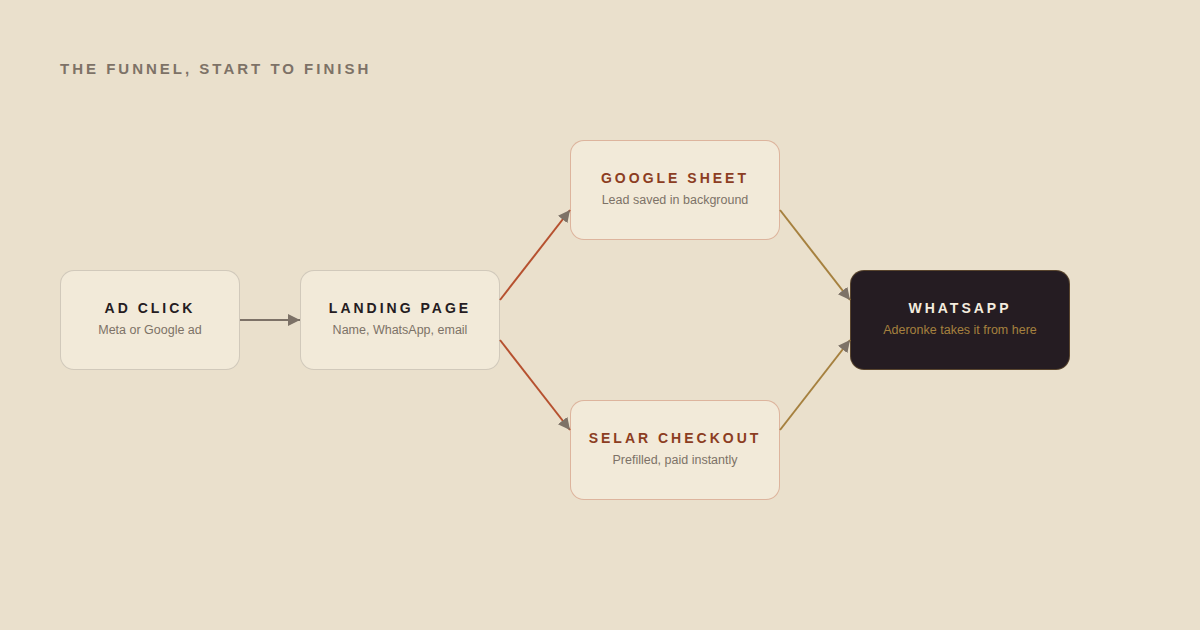
1. Someone clicks an ad and lands on a page.
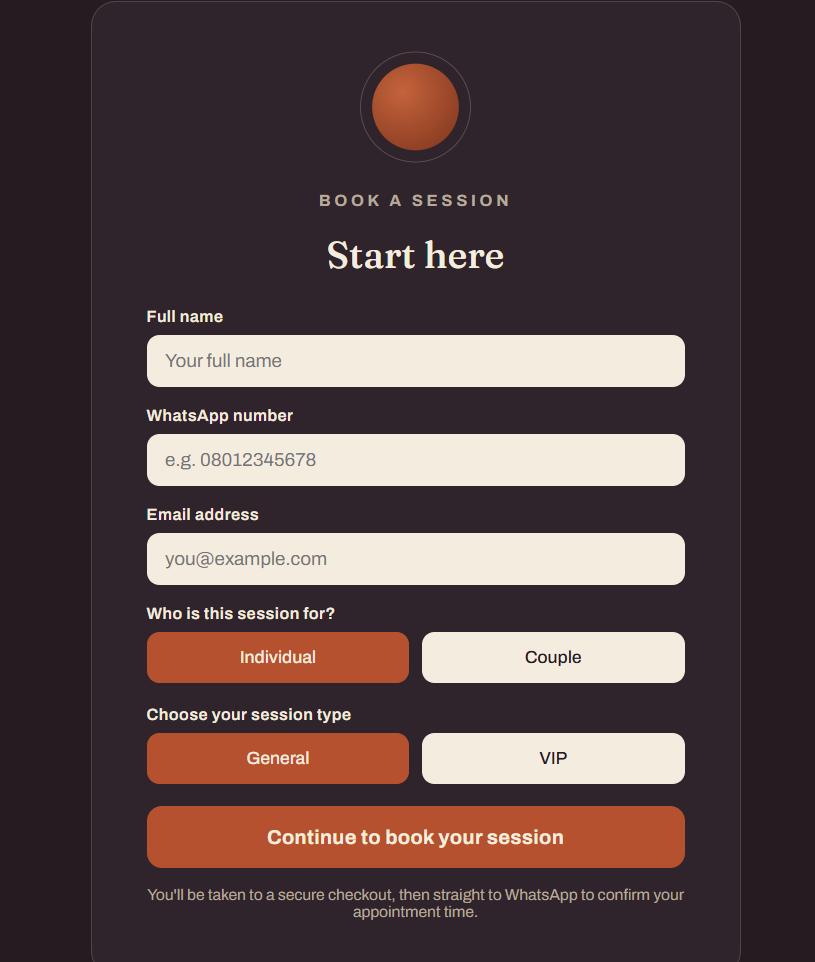
2. They leave their name, WhatsApp number, and email.
3. That information saves itself somewhere we can see it.
4. They get sent straight to a paid checkout for the exact session type they want.
5. After paying, they land in WhatsApp, where Aderonke picks up the conversation.
Every tool decision after this came from that list, not the other way around. If you are building something similar, I would encourage you to write your own sequence first. It is the difference between building an automated booking funnel and building a landing page that happens to have a form on it.
Why we didn’t just use a website builder
The obvious shortcut was a tool like Carrd, since the domain was not even purchased yet and we wanted to launch fast. It turned out Carrd’s free tier does not include a form widget at all, and even on a paid tier, wiring a form to Google Sheets and then to a payment link with a reliable redirect is fighting the tool rather than using it.
Since the real plan was always to eventually build a fully functional website in Next.js, I built the booking page as a real Next.js route from day one, deployed free on Vercel using its own subdomain while the actual domain was still being decided. When it is time to fold this into a bigger site, this page drops in as a route with no rewrite required.
I have written before about the tradeoffs of a Next.js and headless CMS stack if you want the longer version of that argument. For the official framework reference, Next.js’s own documentation is the place to start if you are choosing a stack for the first time.
Turning four price tiers into a decision tree
My wife had four packages for her clients: Individual Counseling in a General and a VIP tier, and Couple Counseling in the same two tiers.
Instead of sending every lead to one generic checkout page where they pick from a menu, which adds a decision point right before payment, I mapped the form itself to exactly one of four fixed checkout links, based on two simple choices: Individual or Couple, General or VIP.
That meant my wife only ever had to set up four products on her e-commerce platform, Selar, and every lead got a checkout link prefilled with their name and email before they even saw the payment page. Selar supports this through query parameters on the checkout link itself, which is documented on Selar’s own site for anyone setting up a similar flow.
The part that had to work no matter what: The redirect
The instruction I kept coming back to during the build was simple. The redirect to checkout must never fail, even if something else on the page breaks. That single requirement shaped the entire technical approach.
The lead’s details get written to a Google Sheet using a service account, which is essentially a robot user Google lets your code log in as. But that write happens as a background request that fires and forgets.
The browser is told to keep the request alive even after the page navigates away, and the redirect to checkout happens immediately, without waiting to see whether the Sheets write succeeded.
If Google’s API has a slow moment, or the request fails outright, the person booking a session never sees it and never gets stuck. Worst case, one row is missing from a spreadsheet, which is recoverable. A broken booking flow, on the other hand, is a lost client.
Redesigning the landing page to look premium
The first version of the landing page used a warm cream background, a serif headline, and a terracotta accent color. It looked fine until I recognized it as one of the most common visual patterns generated by AI design tools right now. For a marriage therapist charging a premium rate for VIP sessions, generic is the opposite of what builds trust.
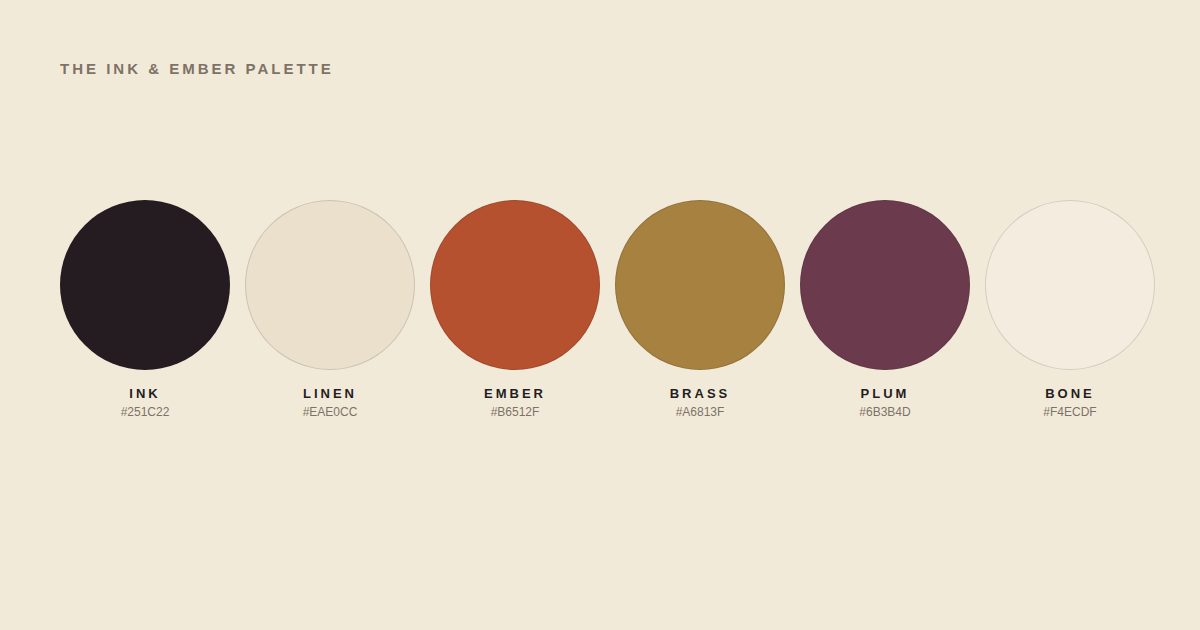
We rebuilt the palette around a different idea entirely: deep aubergine ink, warm linen instead of cream, a burnt ember accent, antique brass for the VIP tier, and a plum tone for anything representing a couple.
The page itself now opens in a dark band, the quiet moment someone decides to reach out, moves through warmer sections as it explains the process, and returns to the dark band for the actual booking form, the decisive step. That structure was intentional, not decorative.
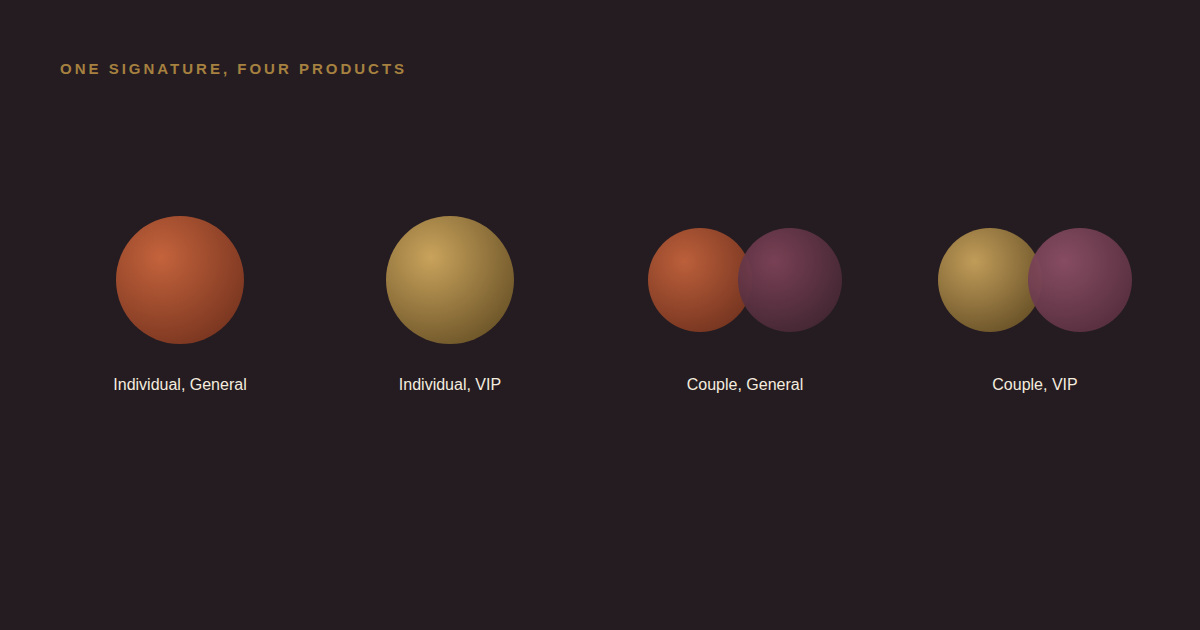
The same circle motif carries through every touchpoint. A single circle for an individual session, two overlapping circles for a couple session, recolored for general versus VIP.
It shows up on the landing page form and on all four Selar product images, so the visual identity holds together from the ad all the way through checkout.
Writing copy that converts without manipulating anyone
Because this was meant to work like a real sales page, not just a form, we added sections a good landing page needs: a short passage naming the kind of friction people actually feel in a relationship before they look for help, a plain explanation of how a counseling psychologist works, an honest FAQ addressing real hesitations like “what if my partner does not want to come,” and a clear process breakdown.
One deliberate choice: there are no client testimonials on the page. Rather than leave an empty placeholder or invent fake quotes, which is both dishonest and a bad look if anyone ever asks where they came from, the copy states plainly that session confidentiality is part of how my wife works, which is also true of most serious therapy practices. It turns an absence into a trust signal instead of a gap.
If you are curious what the research actually says about whether this kind of therapy works, a recent summary from Headway’s clinical resource library cites APA-backed research showing a recovery rate in the 70 percent range for couples using emotionally focused therapy, with a majority reporting significant improvement.
That is the kind of detail worth knowing whether you are the one building the sales funnel or the one deciding whether to book the session.
The error that stopped everything on launch day
Everything worked in testing until the day it mattered. Leads were reaching checkout fine, but nothing was showing up in the Google Sheet. The Vercel function logs pointed to a very specific error:
error:1E08010C:DECODER routines::unsupportedThat error means Node could not even parse the private key used to authenticate with Google’s API. The cause was almost certainly how the key got pasted into Vercel’s environment variable dashboard.
A service account’s private key is a multi-line block of text, and multi-line values do not always survive copy-and-paste into a single-line dashboard field intact. Line breaks get flattened, or an extra pair of quotes ends up baked into the value itself.
The fix was to stop relying on the raw key entirely. Instead, I base64-encode the entire private key, including its line breaks, into a single flat string, then decode it back into the original format at runtime. A flat base64 string cannot be mangled by a dashboard text field the way a multi-line PEM key can. If you want the background on how Google’s service accounts work in the first place, Google Cloud’s documentation on service accounts explains the concept well.
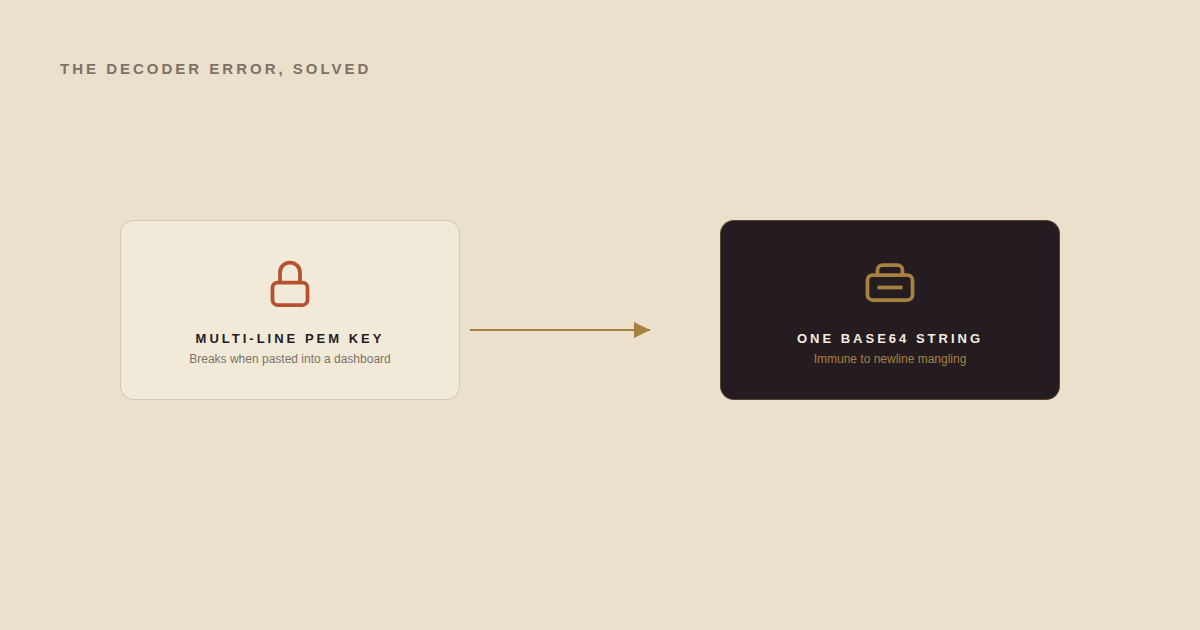
This is the kind of failure that looks intimidating from the error message alone but has a fairly mechanical fix once you know what it actually means.
I have run into enough of these moments building on Vercel that I eventually wrote about the gap between a successful build and a working website, which this bug is a textbook example of.
Doing all of this without touching a terminal
One detail worth mentioning: none of the Git or environment variable work in this project happened in a terminal. Every file edit went through GitHub’s own web interface, and every deploy happened through Vercel’s dashboard.
That is also a completely legitimate way to build and ship a real product, and if you want the full walkthrough of working this way, I wrote a separate guide on using GitHub without the command line.
What launching actually looks like now
Today, the flow runs exactly as planned. Someone clicks an ad, lands on the page, chooses Individual or Couple and General or VIP, and submits their details.
Their information saves to a Google Sheet in the background. They land on a prefilled Selar checkout for the exact session they picked. Once they pay, Selar redirects them straight into WhatsApp, where my wife starts the conversation.
No manual step in the middle, and no lead lost because someone forgot to follow up.
This is not the first time I have built something like this with my wife. A while back we built a full clinical self-assessment platform together, and the pattern is the same each time: she brings the clinical expertise and the standard she needs the work to meet, and I bring the systems that make that standard scale past what one person can do manually.
Lessons worth taking if you are building something similar
A few things I would tell anyone trying to build an automated booking funnel or leads funnel of their own:
1. Write the exact sequence of steps before picking a tool. The tool choice should follow from the sequence, not the other way around.
2. If a step in your flow is genuinely allowed to fail silently (like a background data write), design it that way on purpose, with a fallback path to catch what slips through, rather than letting it accidentally block something critical like a payment redirect.
3. Check whether your design defaults to a look you have seen a hundred times before. If it does, it is probably an AI-generated cliché, and it will cost you trust with the exact audience you are trying to earn.
4. Never fabricate social proof. If you don’t have real testimonials yet, say so honestly, or reframe the absence as a value in itself if it genuinely is one.
5. When you hit a cryptic error, read what it is actually telling you rather than guessing. DECODER routines::unsupported sounds unrelated to a copy-paste mistake, but it was exactly that.
If you are building your own version of this and want a second pair of eyes on the architecture, or you want help with the content and SEO side of a launch like this, you can see more of what I work on in my portfolio, or just reach out directly.
And if you are reading this because something in the article about “the same argument, just with different words” landed a little close to home, that page exists for exactly that reason.
Frequently asked questions
What is an automated booking funnel?
It is a sequence that takes someone from an ad click to a paid, scheduled appointment without a human manually following up at any step in between. In this case, that meant a landing page, a background data save, a prefilled checkout, and an automatic handoff to WhatsApp.
Why not just use Carrd or a simple form builder?
Free website builders often do not support the specific combination this needs: a lead form, a reliable integration to a spreadsheet, and a redirect to a payment link that will not fail. Building it in Next.js took slightly longer upfront but meant we owned every part of the logic.
Why did the Google Sheets integration fail after everything else worked?
A malformed private key, specifically one whose line breaks got flattened or altered when pasted into an environment variable dashboard. Base64-encoding the entire key before storing it as an environment variable removes that risk entirely.
Do you need a terminal to build something like this?
No. Every step in this project, from editing code to setting environment variables to deploying, was done through GitHub’s and Vercel’s own web interfaces.
Tags
Share
About the author
Adeyemi Adetilewa
Content Strategy, Product Marketing, and SEO for B2B SaaS
Adeyemi Adetilewa combines expertise in content strategy, product marketing, technical SEO, and AI to help B2B SaaS companies drive product adoption, customer engagement, and sustainable organic growth. Open to remote Product Marketing roles.
Work With Me
Hiring for product marketing, or scaling a B2B SaaS?
I help B2B SaaS companies turn product marketing, content strategy, and technical SEO into systems that drive adoption and organic growth. Open to full-time product marketing roles, contract work, and consulting engagements.
The Digital Strategy Newsletter
Get more like this in your inbox.
Practical insights on SEO, AEO, content strategy, and product building. Free, every week.
Free. View archive. Cancel any time.
Related Content You Might Like

How I Fixed a Bad Push to GitHub and Failed Production Deployment on Vercel
I pushed the wrong files to GitHub. I detected this after I got a failed production deployment email from Vercel. My website was already broken, but I was able to fix it fast. A few days ago I pushed an update to my Next.js and headless WordPress site through the GitHub web app. Vercel auto-deployed … Read more
Adeyemi Adetilewa
Content Strategy, Product Marketing, and SEO for B2B SaaS

How I Migrated to Headless WordPress with Next.js from Hashnode
When Hashnode shut down its free GraphQL API in June 2026, I had several published posts, zero working blog pages, and a Next.js site that was silently returning empty arrays to every visitor. This is the complete, honest account of how I migrated to a headless WordPress with Next.js from Hashnode in under a week, … Read more
Adeyemi Adetilewa
Content Strategy, Product Marketing, and SEO for B2B SaaS

Website Deployment Failure and Recovery Process for GitHub and Vercel
One bad push to GitHub broke my live website. The build succeeded, Vercel deployed it without complaint, and within minutes adeyemiadetilewa.com was serving a broken layout to every visitor who landed on it. What followed was a website recovery process that took under ten minutes, required no terminal, no Git client, and no local development … Read more
Adeyemi Adetilewa
Content Strategy, Product Marketing, and SEO for B2B SaaS