Website Deployment Failure and Recovery Process for GitHub and Vercel

Written by
Adeyemi Adetilewa

One bad push to GitHub broke my live website. The build succeeded, Vercel deployed it without complaint, and within minutes adeyemiadetilewa.com was serving a broken layout to every visitor who landed on it.
What followed was a website recovery process that took under ten minutes, required no terminal, no Git client, and no local development environment, and produced more practical knowledge about deployment, version control, and site stability than I had picked up in months of normal operation.
This blog post is the central hub for a six-part series built entirely from that experience. Each article covers a distinct aspect of what happened, what I learned, and what you can apply to your own setup.
Whether your site just broke and you need a fix right now, or you want to build habits that prevent broken deployments from happening in the first place, there is a starting point here for you.
What This Series Covers
The six articles in this series move from immediate crisis response through foundational knowledge and into long-term prevention.
They are written for developers and site owners who work with GitHub and Vercel, particularly those running Next.js or headless WordPress setups, but the core principles apply to any Git-based deployment workflow.
You do not need to read them in order, and you do not need to read all of them. The reader guide below tells you exactly where to start based on your current situation.
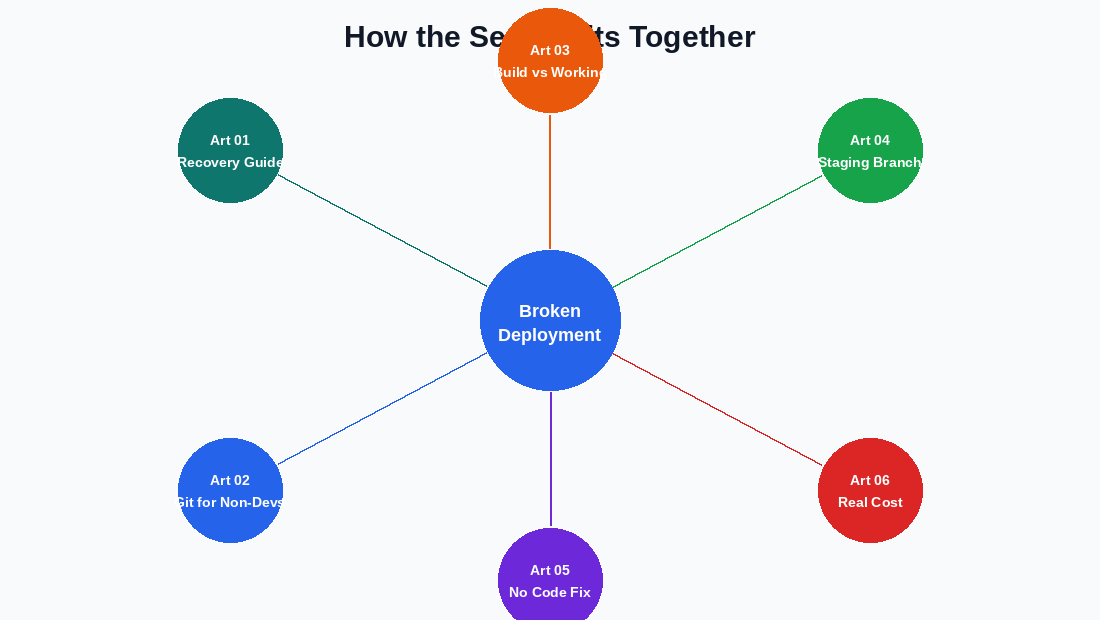
Article 01: Surviving a Broken Deployment
Read: Surviving a Broken Deployment: How I Recovered My Site After a Bad GitHub Push
This is the foundational article in the series. It walks through the complete incident from the moment the bad push went out to the moment the live site was restored, covering every step in the exact order I took them.
The article explains why rolling back a deployment in Vercel is always the first move (it gets your live site stable without touching any code), how to find the last working commit SHA in your GitHub history, and how to restore your repository to a clean state using nothing but the GitHub web interface. It also covers what I would do differently next time, specifically around staging branches and pre-push checks.
Who should read this: Anyone whose site is currently broken after a deployment, or anyone who wants a complete end-to-end picture of how a deployment recovery actually works in practice.
Article 02: Git for Non-Developers
Read: Git for Non-Developers: How to Use GitHub Without the Command Line
Most Git tutorials assume you are comfortable with a terminal. This one does not. It covers everything you need to manage your repository, navigate your history, recover from mistakes, and restore past states of your code using only the GitHub web app in your browser.
The article maps out the four areas of GitHub that matter most for everyday management and emergency recovery: the commit history page, the branch list, the tree view for browsing past commits, and the repository settings. It explains how to read a commit history entry, what a commit SHA is and how to use it, and how to create a new branch from any past commit in four steps without writing a single command.
Who should read this: Developers and site owners who manage their repository through the GitHub web interface rather than a terminal, and anyone who has felt uncertain about what to do in GitHub when something goes wrong.
Article 03: Why a Successful Build Does Not Mean a Working Website
Read: Why a Successful Build Does Not Mean a Working Website
Vercel’s green “Build: Successful” indicator is not a guarantee that your site works. This article explains exactly what the build process checks, what it cannot check, and why visual, content, and runtime errors can pass through a successful build and go live undetected.
The article breaks down the specific categories of errors that a build will catch (syntax errors, missing imports, TypeScript violations, invalid JSX) versus the categories it will miss (layout problems, broken API responses, missing CMS content, mobile rendering issues). It also explains where in the deployment pipeline these silent errors slip through, and what to actually verify before treating a green build as a signal that everything is fine.
Who should read this: Anyone who has ever been surprised to find their live site broken despite a passing Vercel build, or anyone who currently uses build success as their only quality check before a deployment goes to production.
Article 04: Why Every Developer Should Have a Staging Branch Before Pushing to Main
Read: Why Every Developer Should Have a Staging Branch Before Pushing to Main
Pushing directly to the main branch means your live site is updated the moment you commit. There is no window to preview the result in the real deployed environment before visitors see it. A staging branch gives you that window, and setting one up takes about five minutes through the GitHub web interface.
This article covers the difference between a direct-to-main workflow and a branch-based workflow, how Vercel’s automatic preview deployments work for any branch that is not your production branch, and the exact steps for creating a staging branch and making it your default working environment using only the browser. It also covers how to merge changes from staging into main via a pull request, which creates a built-in Revert button that makes rolling back any future broken deployment a one-click operation.
Who should read this: Anyone currently pushing code changes directly to their main branch, particularly on a Vercel-deployed site where that branch maps directly to the live production domain.
Article 05: I Broke My Live Website and Fixed It Without Writing a Single Line of Code
Read: I Broke My Live Website and Fixed It Without Writing a Single Line of Code
This is the personal narrative version of the incident. Where Article 01 is structured around the technical steps, this article is structured around the experience itself: what it felt like, what decisions I made in real time, and what the whole episode clarified about browser-only workflows, deployment recovery, and the assumptions developers carry about what tools they need.
The article walks through a minute-by-minute timeline of the incident, names the only two tools used for the entire recovery (the GitHub web app and the Vercel dashboard), and distills the four most important things the experience taught me. It is the most accessible entry point in the series for readers who are not primarily technical or who find narrative formats easier to learn from than step-by-step guides.
Who should read this: Anyone who wants the full story in a conversational format, or anyone who wants to share the series with someone who is not a developer and needs context before diving into the technical articles.
Article 06: The Real Cost of a Broken Deployment
Read: The Real Cost of a Broken Deployment
A broken deployment is not only a technical problem. It produces costs across four categories: downtime (lost sessions, inflated bounce rates, wasted ad spend), SEO (crawl errors logged by Googlebot, Search Console flags, re-crawl cycles that take days to weeks), trust (first-time visitors who form permanent negative impressions of your brand), and recovery (time, attention, and mental energy spent under pressure instead of on productive work).
This article covers each of those categories in detail and ends with a side-by-side time comparison: a prevention workflow that takes approximately 9 minutes versus a recovery workflow that takes approximately 38 minutes under pressure. The math makes a straightforward case for why checking a Vercel preview URL before every production deployment is the highest-return habit a solo developer or site owner can build.
Who should read this: Anyone who needs to understand the full business and brand impact of a broken deployment beyond the immediate technical inconvenience, or anyone who wants a concrete argument for why prevention habits are worth the small time investment.
Where to Start Based on Your Situation
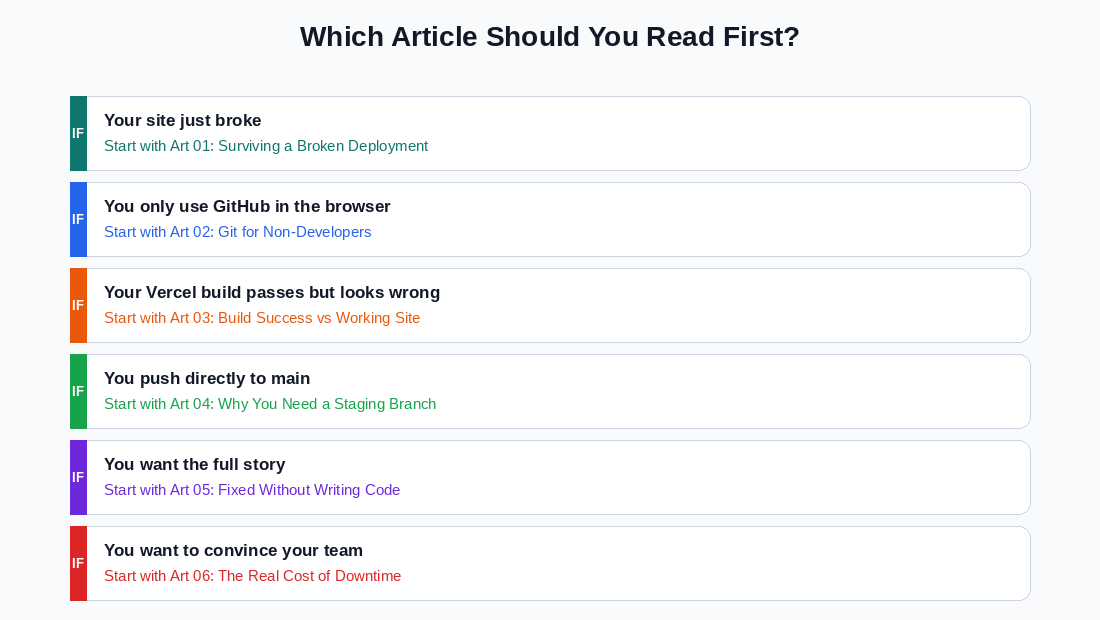
1. Your site is broken right now
Go directly to Article 01. The first section covers the Vercel rollback, which gets your live site stable in under two minutes.
2. You only use GitHub in the browser and want to understand your tools better
Start with Article 02. It covers the four areas of GitHub that matter most and how to use them without a terminal.
3. Your Vercel build keeps passing, but the live site looks wrong
Start with Article 03. It explains exactly what the build process does and does not check.
4. You push directly to main and want to stop doing that
Start with Article 04. It walks through the staging branch setup in five minutes using only the browser.
5. You want the full story before reading the technical articles
Start with Article 05. It is the most readable entry point and gives you the full context of the incident.
6. You want to understand what is actually at stake or need to make the case to someone else
Start with Article 06. It quantifies the costs across downtime, SEO, trust, and recovery time.
The Six Core Lessons
If you take nothing else from this series, these six points cover the essentials.
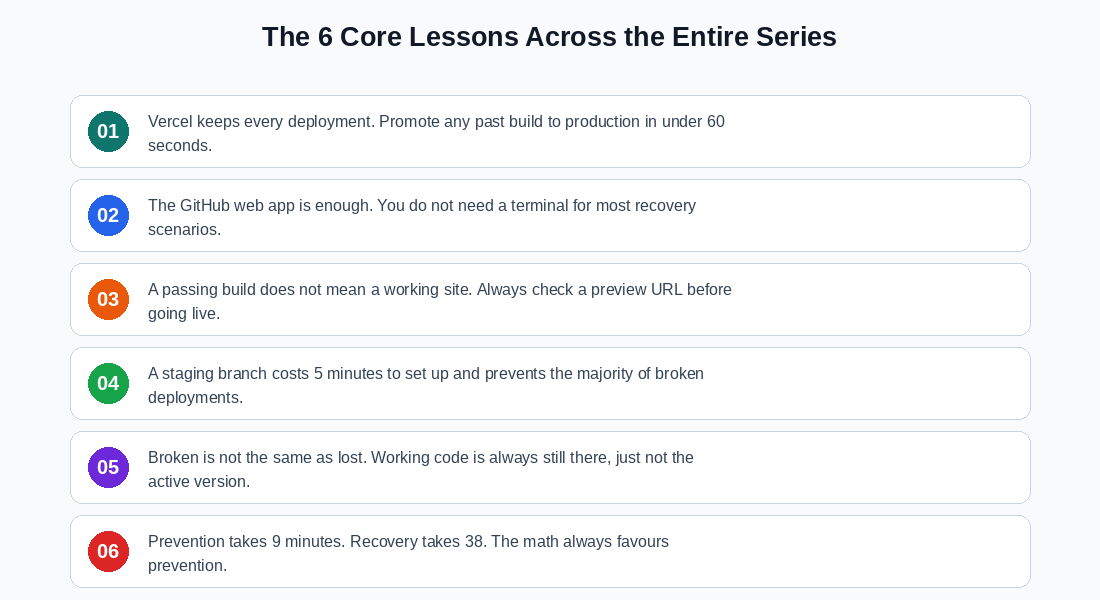
1. Vercel keeps a record of every deployment it has ever built. Promoting any past build to production is an instantaneous operation that does not require touching your code.
2. The GitHub web app is a fully capable recovery tool. A terminal is useful but not required for the most common deployment recovery scenarios.
3. A passing build means your code compiled. It does not mean your website works. Those are different things, and both need to be checked.
4. A staging branch costs about five minutes to create and prevents the majority of broken production deployments by adding a preview step before anything goes live.
5. When a deployment breaks, nothing is deleted. The working version of your code and the working build of your site are both still there. Recovery is about pointing back at what already exists.
6. Prevention takes approximately 9 minutes per deploy. Recovery takes approximately 38 minutes under pressure. Prevention is always the more efficient choice.
About This Series
Every article in this series came from a single real incident on this site. Nothing here is theoretical. The steps were tested in the exact environment described, using the GitHub web app and Vercel dashboard with no local tooling involved.
The goal throughout the series is to give you information that is directly usable the next time something goes wrong, not a general overview of deployment concepts.
If one of the articles helped you recover from a broken deployment or helped you build better habits before one happened, I would genuinely like to hear about it. The contact page is linked in the navigation above.
Tags
Share
About the author
Adeyemi Adetilewa
Content Strategy, Product Marketing, and SEO for B2B SaaS
Adeyemi Adetilewa combines expertise in content strategy, product marketing, technical SEO, and AI to help B2B SaaS companies drive product adoption, customer engagement, and sustainable organic growth. Open to remote Product Marketing roles.
Work With Me
Hiring for product marketing, or scaling a B2B SaaS?
I help B2B SaaS companies turn product marketing, content strategy, and technical SEO into systems that drive adoption and organic growth. Open to full-time product marketing roles, contract work, and consulting engagements.
The Digital Strategy Newsletter
Get more like this in your inbox.
Practical insights on SEO, AEO, content strategy, and product building. Free, every week.
Free. View archive. Cancel any time.
Related Content You Might Like

How I Broke My Live Website and Fixed It Without Writing a Single Line of Code
This is not a theoretical article. I broke my live website, adeyemiadetilewa.com, with a push to GitHub. The build succeeded. Vercel deployed it. And within minutes, I was staring at a broken homepage with no featured blog posts, an empty blog page with no blog posts, and some other missing files. I had a browser, … Read more
Adeyemi Adetilewa
Content Strategy, Product Marketing, and SEO for B2B SaaS

Why You Should Have a Staging Branch Before Pushing to Main Branch
Pushing to main branch directly without having a staging branch is one of those habits that feels efficient right up until it is not. Your workflow is fast, your changes go live immediately, and there is no friction between writing code and seeing it deployed. Then one day you push something to main branch directly … Read more
Adeyemi Adetilewa
Content Strategy, Product Marketing, and SEO for B2B SaaS

Why a Successful Build in a Vercel Deployment Does Not Mean a Working Website
When Vercel tells you “Build: Successful,” it feels like confirmation that everything is fine. It is not. A successful build means your code compiled without errors. It says nothing about whether your website actually works, looks correct, or serves the right content to the people visiting it. This distinction matters, and understanding it is the … Read more
Adeyemi Adetilewa
Content Strategy, Product Marketing, and SEO for B2B SaaS