Why a Successful Build in a Vercel Deployment Does Not Mean a Working Website

Written by
Adeyemi Adetilewa

When Vercel tells you “Build: Successful,” it feels like confirmation that everything is fine. It is not.
A successful build means your code compiled without errors. It says nothing about whether your website actually works, looks correct, or serves the right content to the people visiting it.
This distinction matters, and understanding it is the difference between confidently shipping updates and getting blindsided by a broken live site.
What “Build” Actually Means
When you push code to GitHub, and Vercel triggers a deployment, the build process does the following:
It installs your project’s dependencies. It runs your framework’s build command (for Next.js, this is next build). It compiles your JavaScript, processes your styles, and generates the static or server-rendered output that will be served to visitors. If any of those steps produce a hard error, the build fails, and Vercel refuses to deploy, keeping your previous version live instead.
That last part sounds like a safety net, and for some categories of error it is. But the build process is a compiler, not a browser. It checks whether your code is valid enough to execute. It does not check whether the output looks correct on screen, whether your API calls return the right data, or whether a visitor’s experience is what you intended.
What the Build Process Catches and What It Misses
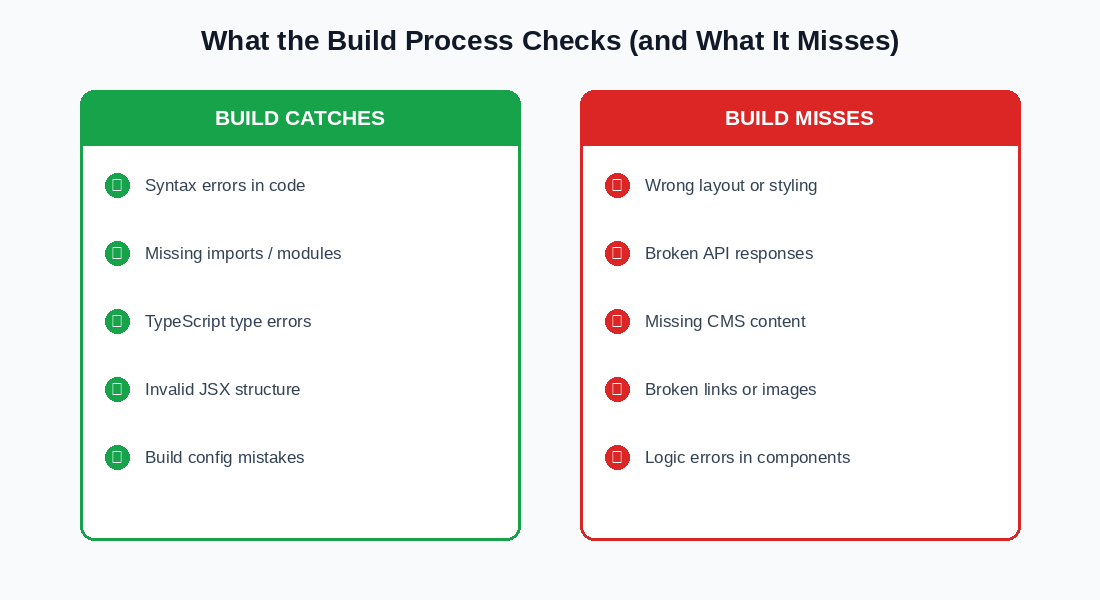
What a failed build will catch:
1. Syntax errors, such as a missing closing bracket or a misspelled keyword that makes JavaScript invalid
2. Missing imports, where a file references a module or component that does not exist or was deleted
3. TypeScript type errors, when a value is passed as the wrong type, and you have strict checking enabled
4. Invalid JSX structure, such as a component that returns multiple elements without a wrapper
5. Build configuration mistakes in files like next.config.js or vercel.json
6. These are code-level problems that prevent the project from compiling at all.
What a successful build will not catch:
1. A layout that renders incorrectly because of a CSS conflict or a wrong class name
2. A component that shows the wrong content because of a logic error in your data fetching
3. Broken images or missing media because of an incorrect file path or a missing upload
4. Content that is not appearing because a WordPress API call is returning an empty or malformed response
5. A page that looks fine on desktop but is completely broken on mobile
6. Links that go to the wrong destination because a URL was changed in the wrong place
7. Any runtime error that only appears after the page loads in a real browser
All of these can go live without Vercel raising a flag, because as far as the build process is concerned, the code is valid.
Where Visual Errors Slip Through the Pipeline
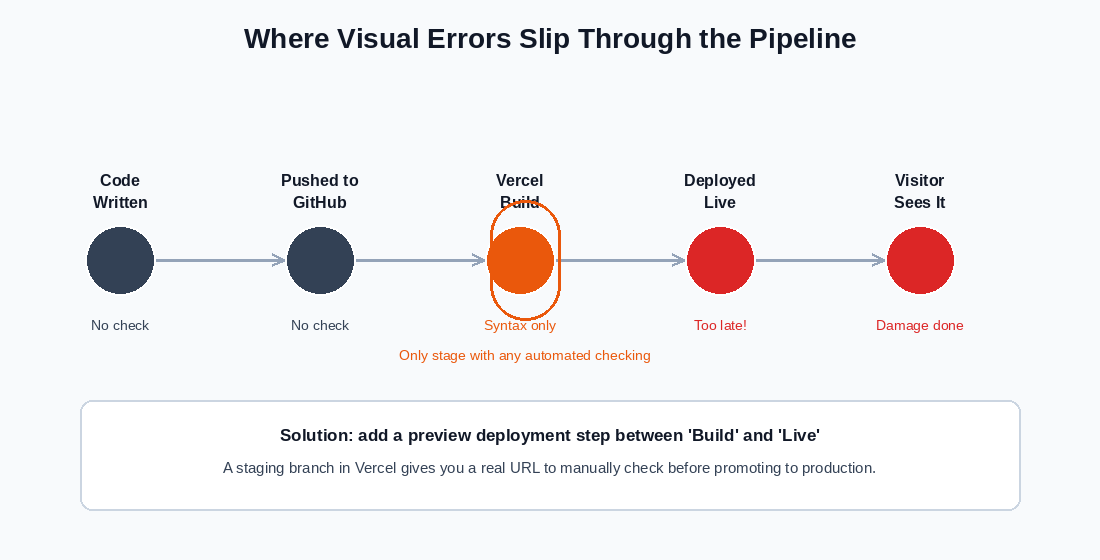
The standard deployment pipeline for a GitHub-connected Vercel project has five stages: you write code, push it to GitHub, Vercel builds it, Vercel deploys it, and visitors see the result.
Of these five stages, only one has any automated checking: the build step. And as covered above, the build step only checks for hard compilation errors.
Everything else is downstream of that single gate. A visual error that compiles fine walks through undetected, gets deployed to your live URL, and is seen by real visitors before you have had a chance to catch it. The moment it is deployed, the damage is already done.
This is not a flaw in Vercel specifically. It is simply the nature of how web deployment pipelines work. The build process is a necessary check, not a sufficient one.
The Gap Between Build and Reality
There is a specific category of problem that is particularly dangerous: errors that only appear when your code runs against real data.
If you have a headless WordPress site, your Next.js components fetch content from the WordPress API at build time or at request time. The build process cannot verify whether those API calls will return the expected structure.
A change to a WordPress custom field name, a deleted taxonomy, or a malformed REST response can cause components to render incorrectly or display nothing at all, and none of that shows up as a build error.
The same applies to environment variables. If a required API key or endpoint URL is missing or incorrect in Vercel’s environment variable settings, your build may succeed entirely, and the failure only appears when the live site tries to use that variable and gets undefined back.
What to Actually Check Before Going Live
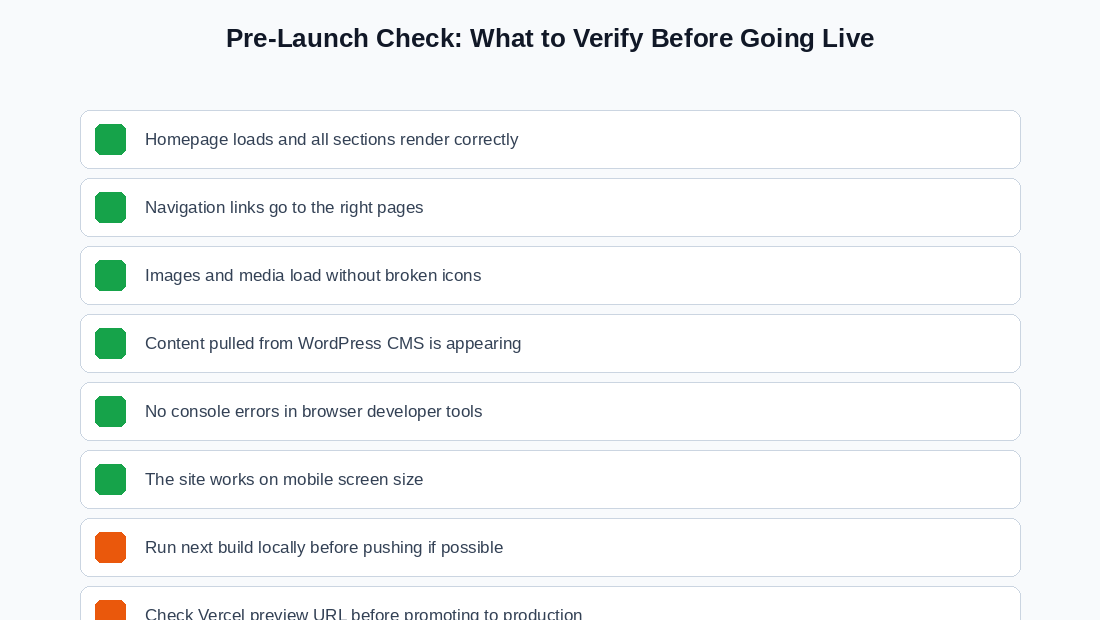
A build success is the minimum bar. Here is what to verify on top of it:
1. Homepage renders completely.
Open the live URL (or preview URL, if you are working from a staging branch) and confirm that all sections are visible and in the right place. Do not assume that because the build passed, the homepage is fine.
2. Navigation works.
Click every item in your main navigation menu and confirm that it goes to the right page and that those pages also render correctly.
3. Media loads.
Check that images are appearing and that there are no broken image icons. On headless WordPress sites in particular, confirm that featured images from WordPress posts are appearing on the frontend.
4. Content is pulling through from WordPress.
If your site uses the WordPress API to populate content, spot-check several posts or pages to confirm the data is reaching the frontend.
5. No console errors.
Open your browser’s developer tools (F12 in most browsers) and look at the Console tab. A successful build can still produce runtime JavaScript errors that appear here and affect how your site functions.
6. Mobile rendering.
Resize your browser window or use the browser’s device emulation mode to check that the site is functional at mobile screen widths.
7. Check the preview URL before promoting to production.
This is the most important habit to build. Vercel creates a unique preview URL for every deployment on any branch. Use that URL as your final check before the build goes to your production domain.
How to Actually Close the Gap
The single most effective change is to add a review step between “build complete” and “live on production.” The way to do that without a local development environment is through a staging branch.
When you push to a branch other than main, Vercel builds a preview deployment and gives it a unique URL that is not your live production domain. You can check the full site on that URL before anything touches production. Only when you are satisfied do you merge the staging branch intomain, which triggers the production deployment.
This workflow means your live site is never updated until you have personally verified the output in a real browser. A passing build is still required, but it is no longer the only gate.
The One-Line Summary
A successful build tells you your code runs. It does not tell you your website works. Those are different things, and you need to check both.
Tags
Share
About the author
Adeyemi Adetilewa
Content Strategy, Product Marketing, and SEO for B2B SaaS
Adeyemi Adetilewa combines expertise in content strategy, product marketing, technical SEO, and AI to help B2B SaaS companies drive product adoption, customer engagement, and sustainable organic growth. Open to remote Product Marketing roles.
Work With Me
Hiring for product marketing, or scaling a B2B SaaS?
I help B2B SaaS companies turn product marketing, content strategy, and technical SEO into systems that drive adoption and organic growth. Open to full-time product marketing roles, contract work, and consulting engagements.
The Digital Strategy Newsletter
Get more like this in your inbox.
Practical insights on SEO, AEO, content strategy, and product building. Free, every week.
Free. View archive. Cancel any time.
Related Content You Might Like

Website Deployment Failure and Recovery Process for GitHub and Vercel
One bad push to GitHub broke my live website. The build succeeded, Vercel deployed it without complaint, and within minutes adeyemiadetilewa.com was serving a broken layout to every visitor who landed on it. What followed was a website recovery process that took under ten minutes, required no terminal, no Git client, and no local development … Read more
Adeyemi Adetilewa
Content Strategy, Product Marketing, and SEO for B2B SaaS

How I Broke My Live Website and Fixed It Without Writing a Single Line of Code
This is not a theoretical article. I broke my live website, adeyemiadetilewa.com, with a push to GitHub. The build succeeded. Vercel deployed it. And within minutes, I was staring at a broken homepage with no featured blog posts, an empty blog page with no blog posts, and some other missing files. I had a browser, … Read more
Adeyemi Adetilewa
Content Strategy, Product Marketing, and SEO for B2B SaaS

Why You Should Have a Staging Branch Before Pushing to Main Branch
Pushing to main branch directly without having a staging branch is one of those habits that feels efficient right up until it is not. Your workflow is fast, your changes go live immediately, and there is no friction between writing code and seeing it deployed. Then one day you push something to main branch directly … Read more
Adeyemi Adetilewa
Content Strategy, Product Marketing, and SEO for B2B SaaS