The Real Cost of a Broken Deployment on a Live Website

Written by
Adeyemi Adetilewa

When a deployment breaks your live website, the first instinct is to treat it as a purely technical problem. The code is wrong, the site is down, you need to fix it.
But the damage from a broken deployment does not stop at the technical layer. It spreads into your traffic numbers, your search rankings, the impressions visitors form of your brand, and the hours you spend fixing something that could have been caught in minutes.
This article breaks down each of those cost categories with specifics, because understanding what is actually at stake is the most effective motivation for building better deployment habits.
The Four Categories of Cost of a Broken Deployment
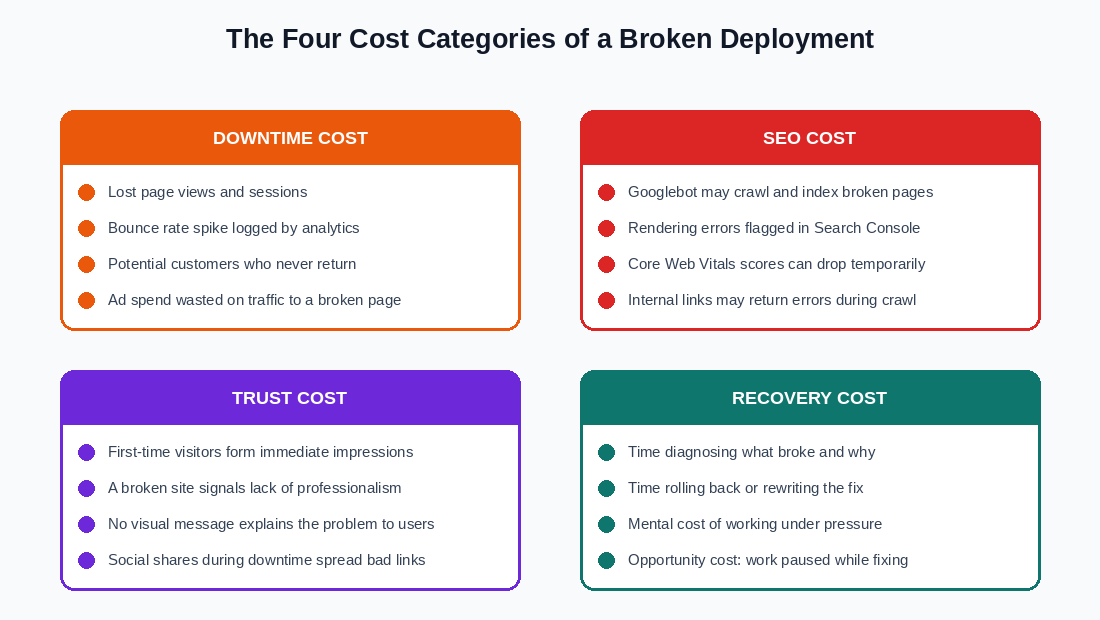
A broken deployment on a live website produces costs in four distinct areas, and they do not all show up at the same time. Some are immediate and visible. Others build quietly in the background while you are focused on the technical recovery.
1. Downtime Cost
The most direct cost is the traffic that hits a broken page and leaves. Every visitor who arrives while your site is broken is a visitor who cannot read your content, contact you, see your portfolio, or take any action you want them to take. They are not getting what they came for, and most of them will not come back to try again.
The specific impact depends on the nature of your site. For a personal portfolio or blog, the downtime cost is measured in missed impressions and reads. For a site that generates leads or sells products, each minute of downtime is a direct business loss.
But even for a content-focused personal site like adeyemiadetilewa.com, the visitors who land on a broken page during an outage represent people who were looking for something specific, found nothing useful, and left with a negative first impression of the brand behind the domain.
Your analytics will also log this accurately and unforgivingly. A session that bounces from a broken homepage inflates your bounce rate, deflates your average session duration, and reduces your pages-per-session metric. For sites that monitor these numbers closely, a single significant deployment incident can noticeably shift monthly averages.
There is also an ad spend dimension if you are running any paid traffic. Traffic driven to a broken page wastes every penny of the budget allocated to it during the outage window.
2. SEO Cost
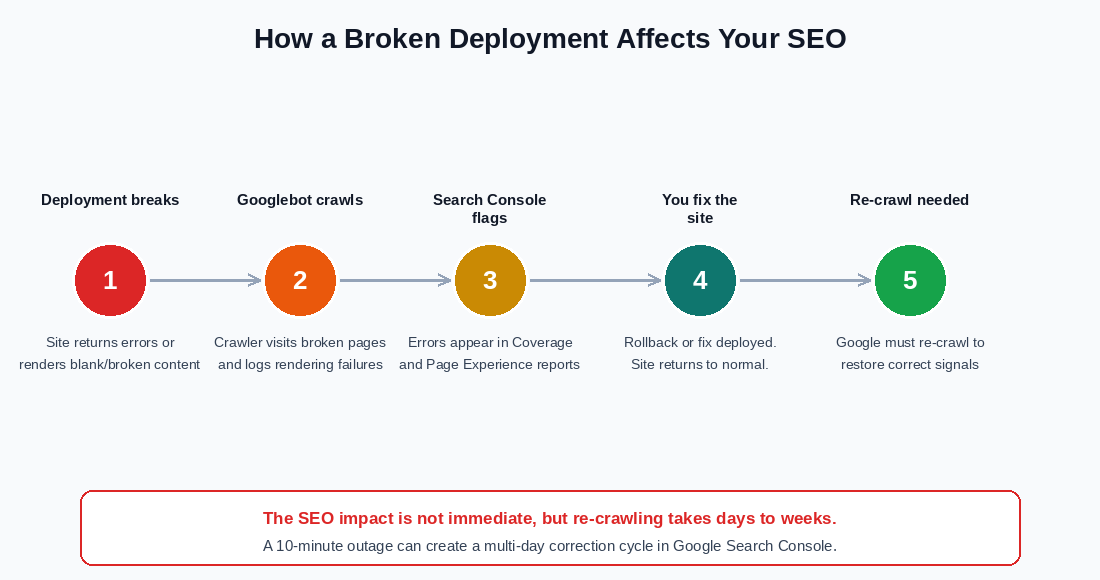
The SEO impact of a broken deployment is the one most people underestimate, because it does not show up immediately.
You fix the site, everything looks normal, and you move on. But Googlebot may have visited during the window when the site was broken, and what it logged during that visit does not reset automatically the moment your site comes back online.
When Googlebot crawls a page that returns errors or fails to render correctly, several things can happen. If the page returns a server error (a 500-level HTTP status code), Google will note that the URL was unavailable and will reduce its crawl frequency for that URL temporarily.
If the page returns a 200 OK status but the content fails to render because of a JavaScript error, Google may index an empty or partial version of the page, which can replace the correct indexed version until Google re-crawls and re-renders the page successfully.
Rendering errors surface in Google Search Console under the Coverage report and the Page Experience section. Even if you fix the underlying problem quickly, these flags persist until Google re-crawls the affected URLs, which happens on Google’s own schedule, not yours.
Depending on the size of your site and how frequently Google crawls it, the correction cycle after a broken deployment can take anywhere from a few days to several weeks.
Core Web Vitals scores are also affected if the broken deployment produces JavaScript errors or missing layout elements, because Chrome users who visit during the outage contribute real-user data to the CrUX (Chrome User Experience Report) dataset that feeds into Search Console’s Core Web Vitals reporting.
None of this is catastrophic for a brief, isolated incident on a small personal site. But the impact is real, and it compounds with each occurrence. A site that has multiple broken deployment incidents over a year will accumulate a meaningful pattern of instability in its crawl data.
3. Trust Cost
Trust is the hardest cost to quantify and the hardest to recover. A visitor who lands on a broken website in 2026 does not think “there has been a temporary technical issue.” They think the site is abandoned, unprofessional, or unreliable, and they click away.
That judgment takes about three seconds to form and has no expiration date in the visitor’s memory.
For a personal brand site, trust is particularly consequential because the site itself is part of the pitch. If someone finds your work through a Google search, a LinkedIn post, or a referral, and they land on a page that does not render, the site has actively worked against you. It has told the visitor something negative about your attention to detail and your standards, regardless of whether those things are true.
Social sharing amplifies this further. If someone shared a link to your site on the same day your deployment broke, every person who clicked that link in the hours following the share saw the broken version. The link they shared has your domain on it. The broken experience is associated with your brand permanently in the mind of anyone who clicked during that window.
There is no clean way to correct a bad first impression that was caused by a broken page. You cannot retroactively fix what someone already saw.
4. Recovery Cost
The fourth category is the one you pay personally, in time, attention, and mental energy. When a deployment breaks, you stop whatever else you were doing and shift into diagnostic and recovery mode. That shift has a real cost even when the recovery itself is fast.
The time breakdown from my own incident was roughly this: noticing the problem and confirming it was real took about four minutes. Finding the last working commit SHA in my GitHub history took another six minutes.
The actual rollback in Vercel took under two minutes once I knew what I was looking for. Restoring the repository branch in GitHub took about ten minutes. Verifying the fix across different devices and browsers took another five minutes. Total time: around 27 minutes, and that was with a clean, knowable fix available immediately.
More complex incidents, where the cause is not obvious or where multiple files were changed in a single push, can take significantly longer to diagnose. And recovery time scales with how much you know about your tools. If you are not already familiar with Vercel’s deployment history or GitHub’s branch management, add substantial time to every step.
Beyond the clock, recovery work happens under pressure. You are aware that your live site is broken while you are working. That awareness is cognitively expensive. It narrows focus, increases error rate, and makes the work feel harder than equivalent work done without urgency.
This is the mental cost that nobody tracks in their incident postmortems but that everyone who has been through a production incident recognizes immediately.
The opportunity cost sits on top of all of this. Every minute spent on recovery is a minute not spent on the work that the deployment was supposed to enable in the first place.
Prevention vs Recovery of a Broken Deployment: The Time Math
The Prevention Workflow
The prevention workflow for a typical deployment looks like this:
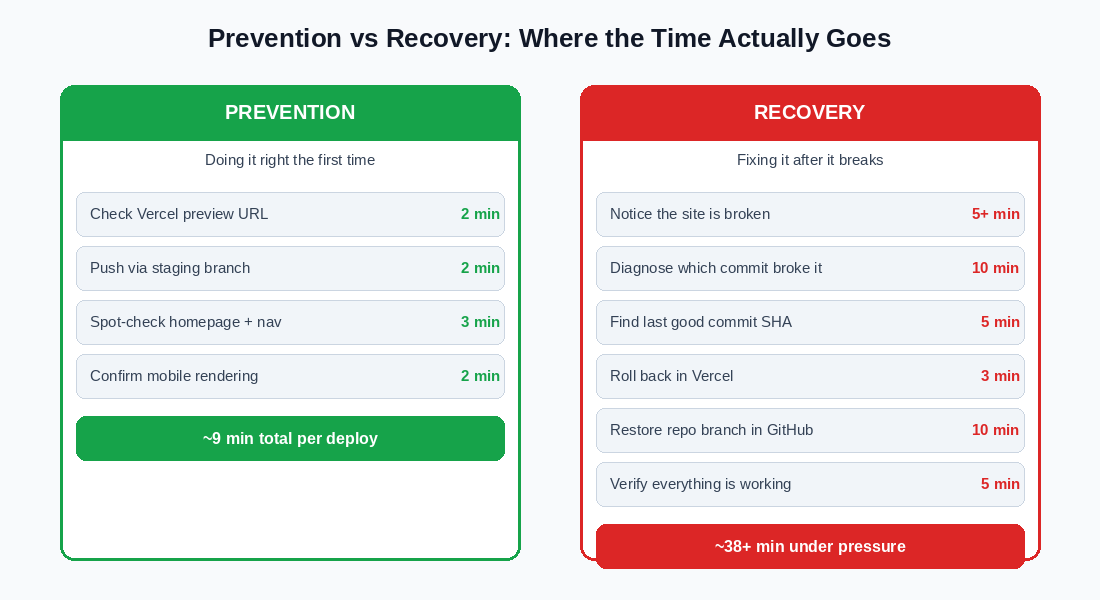
1. Push changes to a staging branch (2 minutes)
2. Check the Vercel preview URL and confirm the homepage renders correctly (2 minutes)
3. Spot-check navigation and any recently changed pages (3 minutes).
4. Confirm the layout on a mobile screen size (2 minutes).
Total: Approximately 9 minutes per deployment.
The Recovery Workflow
The recovery workflow for a broken deployment that goes to production looks like this:
1. Notice the site is broken (5 or more minutes, because you may not be actively watching the site at the moment it breaks)
2. Diagnose which commit caused the problem (10 minutes),
3. Find the last good commit SHA (5 minutes),
4. Roll back in Vercel (3 minutes),
5. Restore the repository branch in GitHub (10 minutes)
6. Verify the fix (5 minutes).
Total: Approximately 38 minutes, under pressure, while the live site is broken.
The 9-minute prevention workflow is also repeatable and low-stress. The 38-minute recovery workflow is non-repeatable (you cannot batch recoveries) and high-stress.
Prevention is more efficient by a factor of roughly four, and that ratio does not include the SEO correction cycle, the trust damage, or the downtime traffic losses that prevention eliminates entirely.
What a Single Incident Actually Costs
Putting specific numbers on these costs requires knowing your traffic volume, your site’s purpose, and your time’s value, all of which differ from person to person. But the structure of the costs is the same regardless of scale:
1. Immediate costs (occur during the outage): lost sessions, wasted ad spend if applicable, broken first impressions for all visitors who land during the window.
2. Short-term costs (occur in the days following): bounce rate and session duration metrics affected, Search Console errors logged, re-crawl cycle begins.
3. Long-term costs (persist until actively corrected): trust deficit with visitors who saw the broken version, potential ranking signals affected until re-crawl completes, mental tax of having dealt with an emergency.
4. Recovery costs (paid in time): diagnosis, rollback, repository restoration, verification, communication if the site has an audience that noticed.
None of these costs are catastrophic in isolation for a small personal site. But they are all real, they all compound across multiple incidents, and they are all entirely avoidable with a staging branch and a two-minute preview check before every production deployment.
The One-Sentence Version
A broken deployment costs you traffic, search signals, visitor trust, and personal time, and every single one of those costs is larger than the time it takes to check a preview URL before pushing to production.
Tags
Share
About the author
Adeyemi Adetilewa
Content Strategy, Product Marketing, and SEO for B2B SaaS
Adeyemi Adetilewa combines expertise in content strategy, product marketing, technical SEO, and AI to help B2B SaaS companies drive product adoption, customer engagement, and sustainable organic growth. Open to remote Product Marketing roles.
Work With Me
Hiring for product marketing, or scaling a B2B SaaS?
I help B2B SaaS companies turn product marketing, content strategy, and technical SEO into systems that drive adoption and organic growth. Open to full-time product marketing roles, contract work, and consulting engagements.
The Digital Strategy Newsletter
Get more like this in your inbox.
Practical insights on SEO, AEO, content strategy, and product building. Free, every week.
Free. View archive. Cancel any time.
Related Content You Might Like

Website Deployment Failure and Recovery Process for GitHub and Vercel
One bad push to GitHub broke my live website. The build succeeded, Vercel deployed it without complaint, and within minutes adeyemiadetilewa.com was serving a broken layout to every visitor who landed on it. What followed was a website recovery process that took under ten minutes, required no terminal, no Git client, and no local development … Read more
Adeyemi Adetilewa
Content Strategy, Product Marketing, and SEO for B2B SaaS

How I Broke My Live Website and Fixed It Without Writing a Single Line of Code
This is not a theoretical article. I broke my live website, adeyemiadetilewa.com, with a push to GitHub. The build succeeded. Vercel deployed it. And within minutes, I was staring at a broken homepage with no featured blog posts, an empty blog page with no blog posts, and some other missing files. I had a browser, … Read more
Adeyemi Adetilewa
Content Strategy, Product Marketing, and SEO for B2B SaaS

Why You Should Have a Staging Branch Before Pushing to Main Branch
Pushing to main branch directly without having a staging branch is one of those habits that feels efficient right up until it is not. Your workflow is fast, your changes go live immediately, and there is no friction between writing code and seeing it deployed. Then one day you push something to main branch directly … Read more
Adeyemi Adetilewa
Content Strategy, Product Marketing, and SEO for B2B SaaS